GameHub for Mac, PC and iOS (2026): What Is Real and How to Get It
GameHub Mac is real: GameSir's GameHub for Mac has been in public beta since 11 April 2026, and it lets Apple Silicon (M-series) Macs play Windows and Steam games. There is no Windows PC version, because PC users can already play their games natively, and the GameHub app for iPhone only sets up controllers – it does not run PC games. This page explains each platform, how to get the Mac beta, and what people really mean when they search for "GameHub PC".
Key takeaways
- GameHub for Mac was teased on 15 February 2026 and opened as a public beta on 11 April 2026.
- The Mac beta is for Apple Silicon (M-series) Macs, and the official page is gamemac.com.
- There is no GameHub for Windows, and you do not need one: Windows PCs run PC games natively.
- GameSir's iOS app called GameHub is for controller setup only; it cannot run PC games on an iPhone.
- GameHub 6.3.1 for Android (September 2026) added scan-to-sign-in for Mac.
Table of contents
GameHub on Android, Mac and iOS at a Glance
GameHub is a full PC-game app on Android, a public beta on Apple Silicon Macs, and a controller-only app on iOS. The table below shows what each version can and cannot do.
| Feature | Android | Mac | iOS |
|---|---|---|---|
| Runs Windows PC games | Yes | Yes (beta) | No |
| Status (Oct 2026) | Version 6.3.1, updated Sep 2026 | Public beta since 11 Apr 2026 | Controller app only |
| Hardware | Android 10 or newer; Snapdragon best | Apple Silicon (M-series) Macs | iPhone |
| Where to get it | Google Play or the official GameHub website | Official page gamemac.com | App Store |
| Game stores | Steam, Epic, GOG, EA | Steam (credentials or QR code login) | None |
| Cloud saves | Steam cloud saves | Cloud-save sync | None |
| Upscaling | AMD FSR 3 and frame generation | AI "Super Resolution", VSync control | None |
| Main use | PC games on phones and handhelds | Windows games on a Mac | Set up GameSir controllers |
Android is still the main platform. If you want the phone app, start with our GameHub APK guide, which covers the latest version and requirements.
What Is GameHub for Mac?
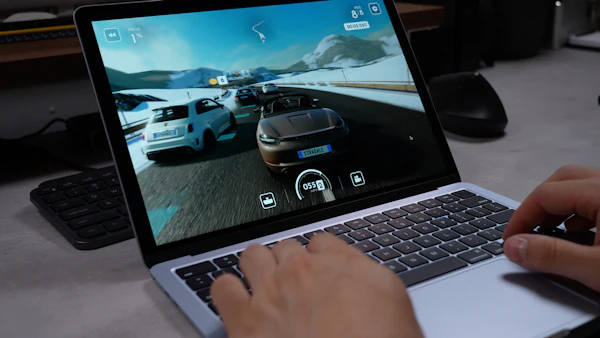
GameHub for Mac is GameSir's desktop app that lets Apple Silicon Macs play Windows and Steam games. It was teased on 15 February 2026 and opened as a public beta on 11 April 2026.
Like the Android app, GameHub for macOS is built around Wine, the Windows compatibility layer. On the Mac you can even choose the Wine version for each game. The beta focuses on Steam: you sign in, see your library, install games and play them on your Mac.
Main features of the Mac beta
- Steam login with your username and password, or with a QR code.
- Multi-account support, so you can add more than one Steam account.
- Cloud-save sync, so your progress can move between devices.
- Per-game settings: Wine version, DLL overrides, MetalHUD overlay, environment variables and launch arguments.
- AI "Super Resolution" upscaling to make games look sharper at lower render resolutions.
- VSync control to reduce screen tearing.
MetalHUD is Apple's performance overlay, so you can see frame rate and other numbers while you play. DLL overrides, environment variables and launch arguments are advanced options. Most players can leave them alone unless a guide for a specific game tells them to change something.
The Android and Mac apps also work together. GameHub 6.3.1 for Android, updated on 23–24 September 2026, added a scan-to-sign-in option for Mac, so you can use the phone app to help sign in on the Mac version.
Which Macs Can Run GameHub?
GameHub for Mac is made for Apple Silicon Macs, meaning models with an M-series chip. If your Mac has an Intel chip, this beta is not meant for it.
To check your Mac, open the Apple menu and choose "About This Mac". If the "Chip" line shows Apple M1, M2, M3 or newer, you have Apple Silicon. If it shows an Intel processor, GameHub for Mac is not for you.
GameSir has not shared official Mac benchmarks in the sources we use, so we do not give FPS numbers here. As on phones, results will depend on the chip, the game and your settings. Heavy AAA games will need more power, and online games with anti-cheat are a bad bet under translation. For a general idea of which games run under GameHub, see our GameHub compatibility list.
How to Get GameHub for Mac
Download GameHub for Mac only from GameSir's official Mac page at gamemac.com. It is a beta, so expect some bugs and frequent updates.
- Check your chip. Make sure your Mac has an Apple M-series chip, as shown above.
- Open the official page. Go to the official GameHub for Mac page and find the beta download. Check the page for the current system requirements.
- Install the app. Follow the on-screen steps. macOS may ask you to confirm that you want to open an app downloaded from the internet.
- Sign in to Steam. Use your Steam username and password, or scan the QR code. You can add more than one account.
- Install a game. Start with a lighter or older game to see how your Mac performs.
- Tune settings only if needed. Turn on the MetalHUD overlay to watch frame rate, try AI Super Resolution for heavier games, and use VSync if you see tearing.

Is There a GameHub for PC (Windows)?
No, there is no GameHub for Windows PC, and you do not need one. GameHub exists to run Windows games on devices that are not Windows; on a Windows PC, you simply install Steam, Epic Games, GOG or EA and play the games natively.
People who search for "GameHub PC" usually want one of three things.
1. The Mac version
Many searchers simply mean a computer, not Windows. If you have an Apple Silicon Mac, the Mac beta above is the real "desktop GameHub".
2. GameHub inside an Android emulator on PC
Some people try to install the GameHub APK file in an Android emulator on PC, such as BlueStacks. This is not recommended, and Android emulators on PC generally cannot run it well. GameHub is built for phone hardware: it uses Box64 to translate x86 PC code to ARM, and it bundles phone GPU drivers such as Turnip for Adreno. Inside a PC Android emulator, you would run a Windows game through an Android layer on top of Windows. That adds problems and gives no benefit over playing the PC version directly.
3. The Linux "GameHub" launcher
There is an unrelated open-source project also called GameHub on GitHub (tkashkin/GameHub). It is a game launcher for Linux and has nothing to do with GameSir. If you found a "GameHub" for Linux desktops, that is the project you saw. It does not run the Android GameHub app.
To learn how the real GameHub translates Windows games for Android, read our explainer on the GameHub emulator.
Is There a GameHub for iOS (iPhone)?
GameSir does have an iOS app called GameHub, but it is only for controller setup. GameHub on iOS does not run Windows PC games on an iPhone.
The iOS app is a companion for GameSir controllers. It is not the PC game app you see in Android videos. If a website offers a "GameHub iOS" download that claims to run PC games, treat it as fake.
If you want PC games on an iPhone, the realistic route is streaming from your own gaming PC with an official streaming app such as Steam Link, or using a cloud gaming service. Your iPhone then shows the game, while a real PC or server does the work.
GameHub Mac vs Android: Which Should You Use?
Use GameHub for Mac if you own an Apple Silicon Mac and want your Steam library on it; use the Android app for phones and handhelds. Both support cloud saves, so progress in games that use Steam Cloud can follow you.
- Android – portable, works with Bluetooth and USB controllers, has FSR 3 frame generation, and supports Steam, Epic, GOG and EA. It is the stable, main version.
- Mac – bigger screen, keyboard and mouse, and fine control with per-game Wine settings. It is still a beta.
For Android, reviewers suggest a Snapdragon 8 Elite for the best results, a Snapdragon 8 Gen 2 or 8 Gen 3 as a good choice, and 8–12 GB of RAM. Our GameHub best settings guide explains drivers and performance options. When you are ready, use our GameHub download page to get the Android app from an official source, then follow the guide on how to download games on GameHub.
Bottom Line
GameHub for Mac is a real public beta for Apple Silicon Macs, live since 11 April 2026, with Steam login, cloud-save sync and per-game Wine settings. "GameHub for PC" does not exist because Windows PCs do not need it, and running the Android app in an emulator like BlueStacks is not recommended. On iOS, GameHub is only a controller app. For playing PC games on a phone, the Android app is still the main way to use GameHub.
Download GameHub APK 6.3.195 MB · Android 10+ · Official sources only
Download APKFrequently Asked Questions
Is GameHub available for Mac?
Yes. GameHub for Mac has been in public beta since 11 April 2026 for Apple Silicon (M-series) Macs. You can get it from the official page at gamemac.com.
Does GameHub for Mac work on Intel Macs?
The Mac beta is made for Apple Silicon Macs with M-series chips. If your Mac has an Intel processor, it is not the target of this beta.
Is there a GameHub for Windows PC?
No. GameHub runs Windows games on devices that are not Windows, so a Windows PC does not need it. On a PC, you play your Steam, Epic, GOG or EA games natively.
Can I run GameHub on BlueStacks or another Android emulator?
It is not recommended. GameHub is built for phone chips and GPUs, and Android emulators on PC generally cannot run it well. On a PC, it is much better to play the Windows version of the game directly.
Is GameHub available on iOS?
GameSir's iOS app called GameHub is only for setting up controllers. It does not run Windows PC games on an iPhone, so any site offering a "GameHub iOS" that plays PC games is fake.
Is the Linux GameHub the same as GameSir's GameHub?
No. The Linux GameHub (tkashkin/GameHub on GitHub) is a separate open-source game launcher. It has no link to GameSir's Android or Mac app.